
How to add vocals to a beat depends on what you already have. If you have an instrumental and lyrics, you need a sung performance written onto that track. If you already recorded a vocal, you need that recording mixed against the beat. Those are different jobs. Search results often sell them as the same upload.
Mixing tutorials such as Sage Audio's guide to mixing vocals into a beat assume the singer already exists as audio. Browser generators assume the opposite: the beat exists, the vocal does not. Start from the files on disk, not from the tool name.
Choose the Job Before You Choose the Tool
| What you have | Result you want | Right job | Wrong next step |
|---|---|---|---|
| Beat or instrumental, plus lyrics or a sung idea | A vocal performance on that accompaniment | Generate vocals onto the instrumental | Opening a DAW to mix a vocal you have not recorded |
| Beat plus a recorded vocal | The same two files, balanced and aligned | Mix, tune, and arrange in a DAW | Regenerating AI vocals and hoping they replace your take |
| Vocal only, no usable beat | An arrangement under the performance you want to keep | Add an instrumental to the vocal | Uploading the vocal into an add-vocals tool and expecting a new beat |
The inverse path already has its own guide. If the valuable recording is a solo vocal or voice memo, use how to turn a voice memo into a song instead of this page.
Confirm You Can Use the Beat
Generate or mix only on a beat you created, a file you have permission to adapt, or material whose license allows the use you plan. In the United States, a musical work and a sound recording are separate copyright-protected works. The U.S. Copyright Office musician guidance and its circular on derivative works explain why permission, a suitable license, public-domain status, or an applicable exception usually comes first.
A free MP3 from a beat store is not automatically free to release with new vocals. If the rights are unclear, stop and get advice for your jurisdiction and release plan. The rest of this article assumes the instrumental is yours to use.
Generate Vocals onto the Instrumental
Use this path when the beat should stay, and the missing piece is a singer. LumiMusic Add Vocals is built for that: you provide the accompaniment, the words, and a style, and the model sings over the track. It does not pitch-correct a vocal you recorded, and it does not duck the beat under a take the way a mixer would.
1. Give the model a clean instrumental
Upload a beat or backing track, or pick one you already generated in LumiMusic. Current uploads accept MP3, WAV, FLAC, OGG, WebM, and M4A, up to 20 MB and 8 minutes. Leave lead vocals off this file. If the “beat” already contains a hook vocal you wanted to replace, isolate a clean instrumental first using the AI Vocal Remover before generating new vocals. If you want to transform the whole arrangement, that is a remix problem, not a first vocal.
2. Write lyrics that fit the track you actually have
The lyrics field is required. Section tags such as [Verse] and [Chorus]
help the performance follow the arrangement you hear. If you only have a
theme, draft lines first in the
AI lyrics generator rather than pasting a mood
sentence into the vocal box.
Match length to the instrumental. A 16-bar loop with three verses of lyrics will not become a radio edit by itself. Cut lines, or extend the beat, before you blame the singer.
3. Describe the vocal, not a second beat
Style is required. Name the vocal character and how it should sit on this instrumental: register, delivery, and a genre that already belongs to the beat. Optional vocal gender can bias male, female, or neutral. Title the result so you can compare takes.
Add Vocals currently offers R1, V4.5, V5, and V5.5. R1 and V4.5 are available without a paid plan. V5 and V5.5 require Starter or an active credit pack. R2 is a music-generator model and is not in this list. Newer is not automatically better for a simple hook. Keep the beat and lyrics fixed while you change one control at a time.
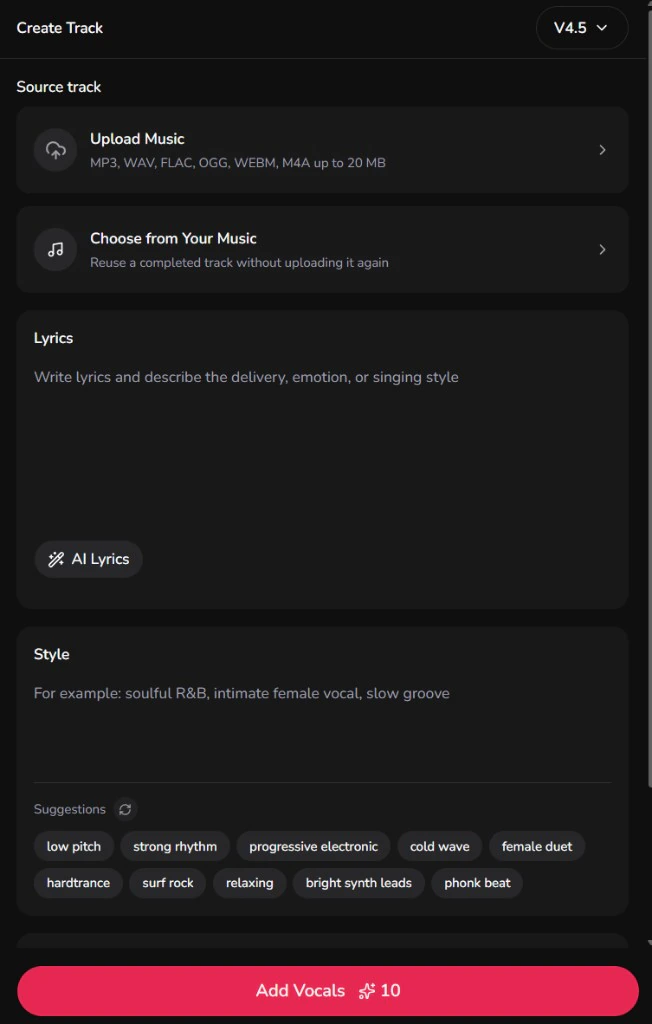
4. Listen for the beat, not only the voice
Play the result against the original instrumental at a matched level.
- The groove and chord movement should still be the same track.
- Lyrics should land on the sections you marked.
- The vocal should sound performed on this arrangement, not pasted from another song.
If those fail, change the lyrics, style, or source beat. Do not reach for a compressor yet. You still do not have a mix session. You have another generated take.
Mix When the Vocal Already Exists
If the singer is already a file, generating a new vocal throws that performance away. The work is alignment, masking, and balance.
Sage Audio's mixing article is typical of that job: EQ the beat so it does not cover the vocal, reduce competing resonances, and duck frequencies when the singer is present. Those steps need two audio sources on a timeline. A browser add-vocals form cannot do them because it never receives your recording as the vocal source.
Use a DAW when you need any of the following:
- Your phrasing, timing, or lyric stresses kept exactly
- Pitch correction on a specific take
- Manual fades, doubles, or a stacked chorus
- Frequency carving between a dense beat and a recorded vocal
After a generated vocal, you can still export and mix, or polish the stereo bounce with AI Mastering for a quick commercial loudness check. That is finishing, not the decision this page is about.
Build the Beat Around the Vocal Instead
Related searches for adding vocals often include the reverse: add an instrumental to a vocal. That is the correct move when the vocal is the keeper.
On LumiMusic that conversion page is Add Instrumental. It starts from a sung or spoken performance and writes accompaniment around it. Do not upload that vocal into Add Vocals and expect a new beat. Add Vocals keeps the instrumental and invents the singer.
If the vocal is already inside a full song and you want a different arrangement, that is a remix. Use the remix guide and the AI music remixer.
Fix Takes That Miss the Beat
The singer ignores your lyrics. Shorten the prompt to the words that must be sung. Put section tags on their own lines. Remove production notes from the lyric box and put them in style.
The vocal floats off the groove. The model is generating a performance, not warping audio to a grid. Tighten the lyric rhythm, or pick a style that matches the beat's time feel. If you need a syllable on a specific snare, nudge the exported vocal in a DAW. Checking the beat with the Key & BPM Finder beforehand gives you the exact tempo to set your DAW project grid so aligning vocal clips takes seconds instead of guesswork.
The character is wrong. Change vocal gender or the style sentence. Do not stack three genre names that fight the instrumental.
You wanted your voice, not a generated one. Stop regenerating. Mix the recording you have. Add Vocals cannot clone an uploaded dry vocal onto the beat.
The beat is cluttered once a vocal appears. That can be arrangement, not a failed singer. Thin the instrumental, generate again with a style that leaves space, or finish the balance in a DAW. For a different genre around the same vocal idea, remix instead of adding a second vocal.
What “Done” Means
You are done with this decision when the next hour of work is obvious:
- Generate another vocal on the same beat, or
- Mix the recording you already have, or
- Flip the job and build an instrumental under a keeper vocal.
If you still cannot say which of those three you are doing, do not upload again. Name the files in front of you first.