
How to add an instrumental to vocals depends on what you already have. If the keeper file is a solo vocal, you need accompaniment written around that performance. If the keeper file is already a beat, you need a singer, not a second arrangement. Search results often sell those jobs as the same upload.
If you already have a beat, use Add Vocals and how to add vocals to a beat. The rest of this page assumes the vocal is the piece you want to keep.
Choose the Job Before You Upload
| What you have | Result you want | Right job | Wrong next step |
|---|---|---|---|
| Clean solo vocal or acapella with melody and lyrics | An arrangement under that performance | Add Instrumental | Shopping for a beat that forces you to retune or timestretch the take |
| A beat you want to keep, but no vocal yet | A sung or rapped performance on that beat | Add Vocals | Uploading the beat into Add Instrumental and expecting a new backing track |
| A full mix where the vocal is buried | A new arrangement that still uses the hook | Remix the song | Generating a second instrumental on top of drums that are still in the file |
| A hummed melody or synth idea, no words | Editable notes you can arrange in a DAW | Convert audio to MIDI | Asking an accompaniment tool for piano-roll control it does not return |
A phone memo that mixes speech, guitar, and half-finished lines is not ready for this tool. Isolate the keeper take first with how to turn a voice memo into a song. If you still need structured words before you treat the take as finished, draft them in the AI lyrics generator.
Confirm You Can Use the Vocal
Generate only on a performance you recorded, a file you have permission to adapt, or material whose license allows the use you plan. In the United States, a musical work and a sound recording are separate copyright-protected works. The U.S. Copyright Office musician guidance and its circular on derivative works explain why permission, a suitable license, public-domain status, or an applicable exception usually comes first.
An extracted acapella from a commercial track is not automatically yours to release with a new instrumental. If the rights are unclear, stop. The rest of this article assumes the vocal is yours to use.
Check Whether the Vocal Can Guide an Arrangement
The cleaner and more consistent the take, the easier it is for a generator to write drums and chords that stay with it. A noisy or drifting file often comes back as a cluttered arrangement.
Isolation and bleed
Keep the vocal as dry and solo as you reasonably can.
- Headphone bleed. A loud click leaking into the mic can look like extra percussion.
- Room reverb. Heavy room sound softens transients and makes downbeats harder to hear.
- Extracted acapellas. If you used the AI Vocal Remover, listen on headphones. Residual snares, hats, or watery artifacts are a reason to clean or re-record before you generate.
The model is not a mixer. Background audio in the file can pull the arrangement off your voice.
Timing
You do not need a quantized vocal. You do need an internal pulse. If the chorus jumps ahead and the verse drags, trim or nudge phrases onto a steadier grid in a basic editor before you upload.
Level and length
Do not upload a vocal slammed into the ceiling. Leave peak headroom so drums and bass have somewhere to sit; peaks around -6 dBFS to -3 dBFS are a safe starting point.
Trim long silence at the top of the file. Current LumiMusic uploads accept MP3, WAV, FLAC, OGG, WebM, and M4A, up to 20 MB and 8 minutes.
Guide the Arrangement Without Crowding the Vocal
In a studio, the job after a keeper vocal is space: the voice needs room between about 200 Hz and 4 kHz. A dense guitar, pad, and brass stack in that range will bury the singer. In Add Instrumental, you steer that space with Style, Exclude styles, and the advanced sliders.
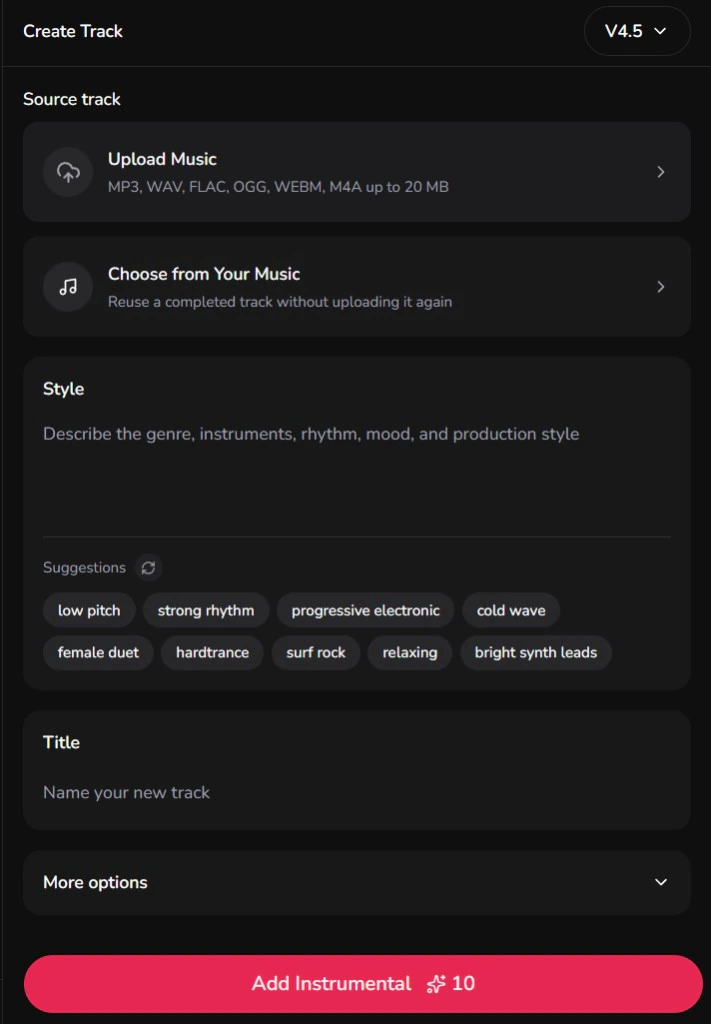
Write Style as instrumentation, not a genre word
One-word prompts such as pop or rock leave the arrangement free to fill
every gap. Name a small set of instruments and the acoustic space:
- Indie pop:
indie pop ballad, warm rhodes piano, fingerpicked acoustic guitar, subtle kick and brush snare, intimate mood - Hip hop:
90s boom bap, dusty vinyl drums, muted upright bass, sparse jazz piano chords, head nodding groove - Electronic:
downtempo melodic house, deep analog sub bass, atmospheric plucks, four on the floor kick, wide reverb tails
Leave tempo words out unless you are describing feel. Style text is a direction, not a BPM lock. If you need a number for a DAW grid, check the vocal with the Key & BPM Finder first.
Use Exclude styles to protect the midrange
The field label is Exclude styles. Use it to keep competing parts out:
- Competing leads:
lead guitar solo, screeching synth, busy arpeggio, brass fanfare - Extra voices:
backing vocals, choir, ad-libs, harmonies - Genre clash:
heavy distortion, distorted 808, double bass drum
Use the labels the form actually shows
Advanced options currently include Vocal gender, Style influence, Source influence, and Weirdness.
- Vocal gender can be Any, Male, or Female. Treat it as a bias, not a promise that the arrangement will leave a specific frequency band empty.
- Source influence controls how strongly the uploaded vocal guides the generated track. If the drums ignore the phrasing, raise it. If the backing copies every syllable, lower it.
- Style influence controls how closely the result follows your Style text. Raise it when the instrumentation sounds generic.
Change one of those controls at a time. The form does not have a separate key or tempo field.
A First Pass, Then One Correction
Take a dry verse-and-chorus acapella, roughly 60 to 90 seconds, no click bleed. In Add Instrumental:
- Upload the vocal or pick a take you already generated in LumiMusic.
- Choose a model. Add Instrumental offers V4.5, V5, and V5.5. V5 and V5.5 require Starter or an active credit pack. R1 and R2 are not in this list. Newer is not automatically better for a simple demo.
- Title the take so you can compare versions.
- Paste a sparse Style line like the indie pop example above.
- Open advanced options. Set Vocal gender to match the singer, add
backing vocals, choir, lead guitar soloto Exclude styles, and leave the sliders at their defaults for the first pass. - Click Add Instrumental. The button also shows the task cost (currently 10 credits). Listen for whether the vocal still sits in front and whether the groove follows the phrases you sang.
If the first pass is piano-and-guitar soup, do not change the vocal. Keep
the same file and tighten only Style and Exclude styles:
minimal arrangement, sparse acoustic instrumentation, vocal forward mix
in Style, and dense synth pads, electric guitar, horn section in Exclude
styles. That is the useful test: one input change, one new listen.
Fix Takes That Fight the Vocal
If the result is wrong, name the symptom before you regenerate.
| What you hear | Likely cause | Change this next |
|---|---|---|
| The vocal is buried or muffled | The arrangement is too dense in the midrange | Add competing instruments to Exclude styles. Put minimal arrangement, sparse acoustic instrumentation in Style. |
| Drums miss the vocal phrasing | Loose timing, or silence at the start of the file | Trim the file. If you need a reference tempo, check the vocal in the Key & BPM Finder, then raise Source influence one step. |
| Energy never lifts into the chorus | Flat vocal dynamics, or Style never names a lift | Add subtle verses, driving chorus drums to Style. If the raw hook is also quiet, the generator cannot invent a louder singer. |
| Extra choir or harmony voices appear | Reverb tails or ad-libs read as an invitation | Add backing vocals, choir, harmonies, vocal chops to Exclude styles. |
| Chords clash with the melody | Tuning drift or ambiguous pitch in the take | Tune the vocal, or inspect the notes with audio to MIDI before you generate again. |
| A rap or spoken take becomes pads and atmosphere | Style never asked for a rhythm section | Name drums explicitly: tight punchy snare, boom bap drums, crisp percussion, rhythmic groove. |
What “Done” Means
You are done with this decision when the next hour of work is obvious:
- Generate another arrangement on the same vocal, or
- Share the stereo draft as a demo, or
- Split the result in the AI Stem Splitter if you need separate tracks in a DAW (available stems depend on the file), or
- Send a balanced bounce to AI Mastering after you run how to prepare a mix for online mastering.
If you still cannot say whether the vocal is the keeper, do not upload again. Name the files in front of you first.